Salvage yard software migration: how to switch without losing data or stopping the business
The number one reason yards stay on software they dislike is not the software. It is the fear of switching - and that fear is rarely about the new program’s interface. It is the fear that the switch itself will stop the business: that parts or photos go missing, that the crew cannot sell, that listings double up or vanish, that the books stop reconciling, and that there is no way back. “Our system is simpler” does not answer any of that. Proof, honest limits, a migration plan, a named owner, and a rollback do. Here is the salvage yard software migration playbook.
Choosing which category of software you need is a separate question - if you have not settled that yet, start with the category buyer’s guide, then come back here to move onto it safely. To score and interrogate a specific vendor, use the scored checklist and RFP questions. This guide picks up once you have chosen a system and need to switch without breaking the yard.
The real fear is the business stopping, not the new software
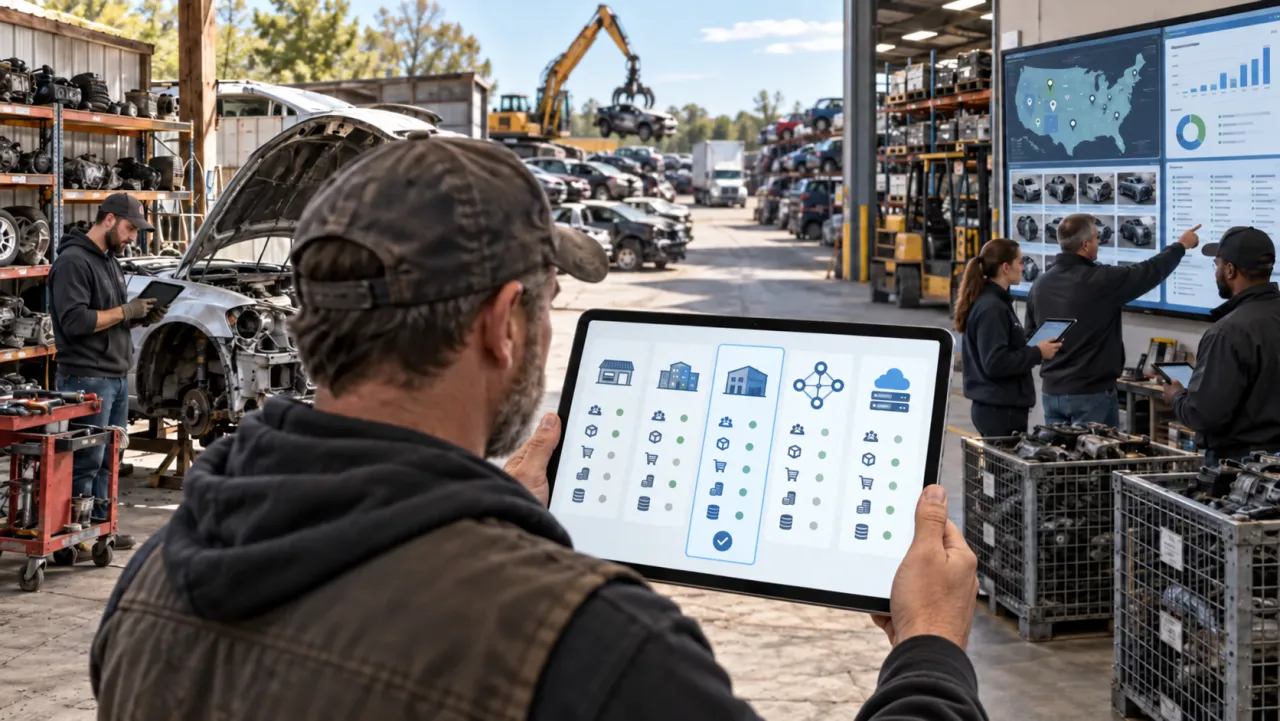
Walk the yard and every role fears a different failure. The owner fears lost revenue and being locked to one vendor. The general manager fears the day-to-day grinding to a halt. Sales fears a slow part search and losing customer history. The inventory team fears more manual entry and weaker interchange. Shipping fears the wrong SKU or freight. Accounting fears that receivables, tax, and payments stop reconciling. Compliance fears that title and reporting records end up incomplete.
None of those are fixed by a nicer screen. They are fixed by removing risk at each step - with a plan you can see, a rollback you agreed in advance, and a person who owns the outcome. The rest of this guide is how to remove each fear with proof rather than promises.
What a salvage yard software migration actually moves (the data checklist)
A migration is not “start over.” It is moving a few well-defined things - but more of them than a parts list. Before you sign anything, build a full inventory of what has to survive:
- Donors and vehicles - VIN, stock numbers, title and acquisition history, disposition.
- Inventory - parts, conditions, ARA grades, mileage and damage codes, locations.
- The data that makes parts sell - interchange selections, OEM numbers, fitment, and your private notes and codes.
- Photos and their links - not just the images, but the photo-to-SKU relationships you already built.
- Customers and money - customer records, quotes, invoices, work orders, open returns, warranty obligations, accounts receivable, and core charges.
- The channel and the trail - marketplace item IDs, historical pricing, sales history and profitability, and the audit trail of who changed what and when.
What a CSV silently drops
“We import a CSV” sounds like an answer and usually is not. A flat CSV routinely drops the relationships, the images, the audit trail, and the complex statuses - the exact things that are hardest to rebuild. Ask for a field map from the old columns to the new ones, a written list of what cannot transfer, a test import you check before the full load, and an exception report for every rejected record. Then reconcile the counts: donors, parts, images, customers, and orders, with image checksums and a physical sample audit.
Dirty data is not a reason to wait
Most yards have duplicate SKUs, mixed VIN formats, unlinked photos, missing OEM numbers, and sold parts still sitting in active inventory. A vendor who says “clean everything first” has just delayed your value by months. The better path: start clean from today, import your active inventory, archive the old backlog separately, fix it by priority, and quarantine only the critical exceptions. Do not block the launch over minor old records. If you are coming off a spreadsheet, moving from Excel to a real system walks the same idea.
Protecting your listings and your eBay account during the switch
This is where a bad migration costs real money, because your listings carry watchers, sales history, and search rank you cannot easily rebuild. The danger is a system that mass-publishes or re-creates listings instead of matching them to what is already live.
Insist on a listing-safety plan:
- Export all active listing IDs from the channel.
- Map each listing ID to a SKU and a part record.
- Get a duplicate and unmatched report before anything publishes.
- No mass publish, end, or reprice without your approval.
- A window where only one system is allowed to change a listing.
- A pilot on 25 to 100 parts, reconciling price, quantity, photos, fitment, and business policies.
- A daily reconciliation of inventory against the marketplace, and an automatic report of failed channel updates.
Why double-selling spikes during a migration
Double sales happen when two systems both think they own the quantity, a webhook fails, a token expires, or a manual local sale never gets recorded. The defense is a single source of truth, an immediate reservation when a part sells, clear statuses (available, reserved, sold, returned, quarantine), a retry and exception queue, and alerts when a delisting fails. Why double-selling happens and how auto-delisting stops it and multi-channel sync go deeper. One honesty check: a vendor who promises double sales will “never happen” is overselling - the honest answer is an architecture, monitoring, and a recovery path.
Keeping interchange and fitment continuity
For an established recycler, interchange is not a feature - it is part of the revenue engine, and losing it means more wrong-fit returns. Treat continuity as a hard requirement, and keep four ideas separate:
- VIN decoding tells you what the original car is.
- Vehicle configuration is the trim, engine, transmission, and drivetrain.
- Fitment is which vehicles a specific part fits.
- Interchange is which other parts and configurations can substitute for it.
A vehicle database, on its own, is not a parts interchange. Make any vendor prove the data source, the right to use and publish it, the number of supported part types, the year, brand, and model coverage, how it resolves complex options and production-date splits, how it handles supersessions and unresolved parts, and whether it preserves your manual corrections. Then test on at least 100 part types on your own VINs, not one lamp in a demo. How auto parts interchange works, the recycler’s guide to fitment and interchange, and what a Hollander interchange number is cover the concepts.
Keeping your crew fast (measure, do not argue)
“My people know the old system blind” is a real concern, and the answer is a stopwatch, not a debate. Measure the same operations before and after: part-find time, quote time, invoice time, parts inventoried and photographed per hour, order-to-pick and order-to-ship, failed-pick rate, abandoned calls, wrong-fit return rate, and the number of required clicks. Set an acceptance bar in writing - for example, after training a salesperson completes ten agreed operations no slower than the old baseline. A new system is often a little slower on the first publish of a part and faster everywhere downstream: less re-entry, faster delisting, fewer returns.
Staff resistance is usually about status and trust, not the tool. The person who was the expert on the old system does not want to look slow on the new one, and a system that shows individual performance can feel like surveillance. Involve the crew in workflow testing, name a champion or two, pay for training time, keep the language plain, and do not hand out punitive targets during the stabilization period.
Test the rare-but-critical workflows live before you sign
Demos show the happy path: create a donor, add a part, make an ordinary sale, admire the dashboard. The money is lost in the exceptions. Make the vendor run these live, on your data, before you buy:
- A brokered order, and a part sold before it is dismantled.
- A core or exchange, a partial refund, and a warranty replacement.
- A tax-exempt customer, freight, and a hazardous item.
- Combining parts from different donors, and returning a different part than was sold.
- A negative-inventory correction, and a void after the day is closed.
- A title exception, a rejected compliance record, a recalled part, and a commission clawback after a return.
Compliance stays yours
Software helps with reporting, but the legal responsibility stays with the recycler. Ask for submission confirmations, a rejected-record queue, a correction workflow, and a monthly completeness reconciliation - and remember that “works nationwide” is not a guarantee that the system handles your state’s title forms, waiting periods, catalytic-converter records, or authority-to-dismantle rules. You can score any candidate against the full vendor checklist.
Reversibility, rollback, and who owns your data
The fear behind every migration is “what if we cannot get back out.” Kill it before you sign:
- A short initial term, ideally month-to-month during the pilot, with acceptance-based cancellation.
- A documented, verified full export - donors, images, customers, transactions, orders, returns, locations, channel IDs, and audit data, not just parts.
- Read-only access to the old system during the transition, and pre-defined rollback triggers.
- A fixed, quoted cost for termination assistance.
And test the export during the trial, not on your way out the door. On data control, get it in writing that you own your data, that it will not be sold, that AI training on your data needs separate consent, and that there are clear retention, deletion, export-format, and API terms.
Cloud outage versus local server - opposite risks
A cloud system can go down, so ask for the uptime history, a status page, the recovery objectives, and an offline lookup or printable daily inventory and price list. An on-premise server has the opposite risks - old hardware, a RAID mistaken for a backup, ransomware, no offsite copy, and nobody who can restore the database. Cloud versus desktop for salvage yards weighs the trade. Either way, insist on an offsite, immutable backup and a tested restore.
The true cost of switching (and the three-year TCO)
The invoice is the small number. The migration also costs overtime, temporary help, reduced production during the changeover, duplicate subscriptions while you run in parallel, data cleanup, delayed listings, and sometimes new labels or scanners. Budget a contingency, especially if the old data is dirty or undocumented.
Then compare the ongoing three-year total cost of ownership with an annual increase cap, not a first-month price - what you actually pay for, compared honestly and the category buyer’s guide both break the number down. To prove the switch actually paid, take a baseline before you start (listings per week, labor minutes per listing, return rate, double-sale rate, unlisted parts, days to first sale) and re-measure at 30, 60, and 90 days. If part of the case rests on pre-bid ROI or per-donor profit and loss, hold those to the same standard - a pre-bid number is a projection built on real used-market prices, not a guaranteed sale.
Your salvage yard software migration plan: safe parallel transition and 30/60/90
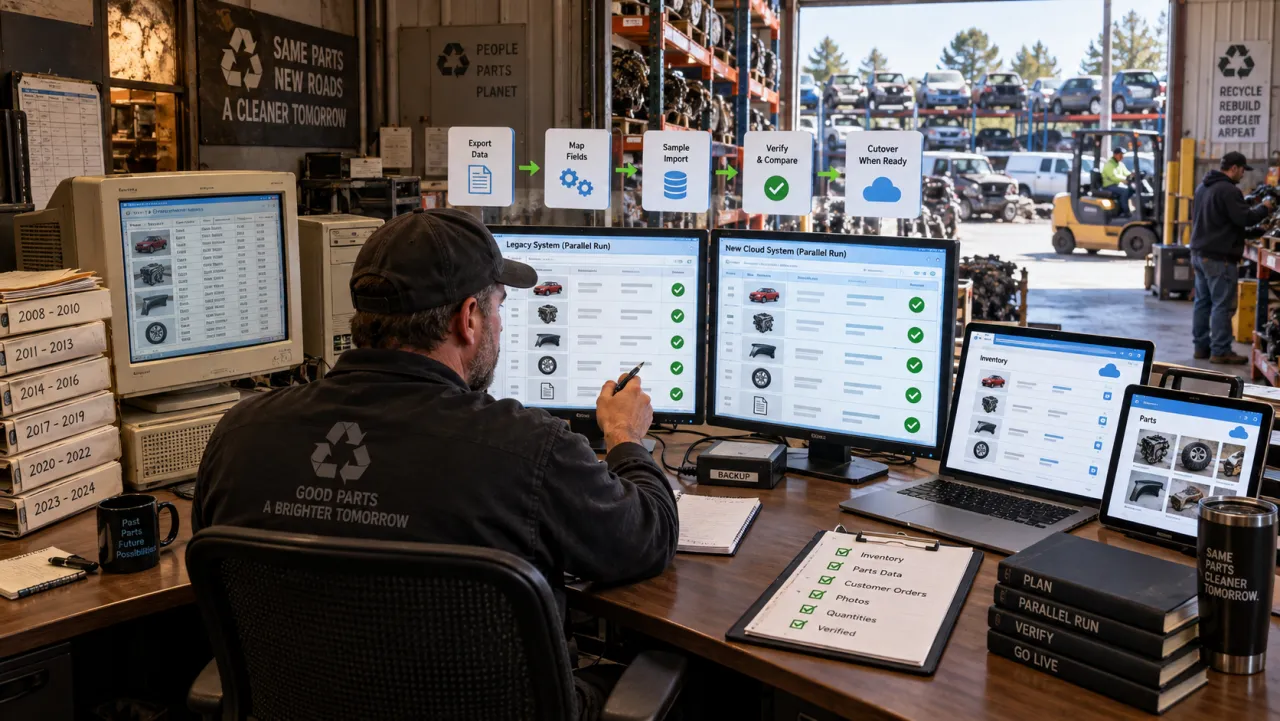
The safest switch never rips anything out. It runs the new system beside the old on a small scope until the data reconciles, then expands. The universal pattern:
- Connect your existing channel account and import your live inventory.
- Bulk-end, reprice, or auto-change nothing.
- Pick one new donor, or 25 to 100 parts, to run through the new system.
- Reconcile SKUs, listing IDs, prices, and statuses against the old system.
- Run a few real orders and returns end to end.
- Measure time and errors against your baseline.
- Verify the full export works.
- Expand scope only after the reconciliation checks out.
How reParta does this
reParta is built for exactly this kind of low-risk switch. You connect your existing eBay store and its listings and inventory come in with a one-click import from day one. You test one new donor, or 25 to 100 parts, in parallel - nothing is bulk-published, ended, or repriced without your approval - so you can reconcile inventory and listing counts before you expand the rollout, with migration help when you switch. eBay listing and takedown run through eBay’s official API, so a part that sells comes down automatically; Facebook Marketplace is an assisted workflow through a free browser extension rather than a hands-off integration, so ask to see exactly which steps are automated. You can prove all of it on your own inventory during a 14-day trial with no card before you move a single record - see the published pricing.
Start a free trial and run one donor in parallel, or first browse auto parts inventory management software.
Want a hand with the move? Send us a request and we’ll help you migrate - your parts, donor vehicles, and eBay listings, so you don’t start from scratch.
Your 30/60/90 plan
- Before launch: fix the baseline, define the scope, run a test migration, reconcile the data, train the champions, verify the rollback, and forbid unapproved bulk changes.
- First 7 days: reconcile daily, keep a war room, log exceptions fast, make no optional changes, and watch orders, listings, and the shipping cutoff closely.
- 8 to 30 days: close the data exceptions, compare speed to baseline, retrain the weak roles, check accounting, and do not add the next location until the first is stable.
- 31 to 60 days: retire the duplicate manual processes, set permissions and reports, and run a full month-end close.
- 61 to 90 days: compute the real ROI, run a post-migration audit, drop unused modules, and lock in your operating procedures.
Success and stop criteria
Call it a success when inventory and listings reconcile with no unexplained gap, order and financial totals tie out, the crew is back to baseline speed, the work runs without the migration team, and the rollback is no longer needed. Pause or stop if double sales continue, images or SKUs vanish, fitment is worse than before, accounting cannot close a period, or the daily work depends on a feature still on the roadmap.
When not to switch - and when reParta is not the right fit
The most trustworthy thing a vendor can do is tell you when to walk away. Stop or narrow the deal if the interchange or channel integration you depend on is not there, if critical data cannot be moved, if there is no full export, if no one inside your business owns the implementation, if the economics do not pay off, if a critical point-of-sale, compliance, or production workflow is missing, or if you expect a legal guarantee of compliance that no software can give.
And reParta is not the right fit for everyone. If you need deep part-level interchange, a self-service or U-Pull-It system built around the gate, scale, and commodity tracking, or full enterprise production, brokering, and counter-POS modules, a different category is the better call - the category guide points you to it. Sometimes the right answer is a pilot, a narrower scope, or “not yet.” A salvage yard software migration you can prove on your own data, and reverse if it disappoints, is the only kind worth making.
Frequently asked questions
Will switching salvage yard software stop my business?
It should not, if you never switch blind. The safe pattern is a parallel run: the new system operates alongside the old on a small scope while the old one stays live and authoritative, so daily work continues. You cut over only after inventory-versus-listings counts and a few real orders reconcile, and you keep a pre-agreed rollback you can trigger if something is wrong. The risk lives in the big-bang cutover, not in the software itself.
What data can I lose when I migrate recycler software, and what usually does not transfer?
The structured data - parts, donors, customers, orders - usually moves. The things that silently drop are the relationships and history: photo-to-SKU links, interchange selections, the audit trail of who changed what and when, open returns and core charges, historical pricing, and marketplace item IDs. 'We import a CSV' is a warning sign, because a CSV routinely drops images, statuses, and history. Demand a full data inventory, an old-to-new field map, and a written list of what cannot transfer before you start.
Will switching break my eBay listings or hurt my eBay account?
It can if a vendor mass-publishes or re-creates listings instead of matching them to your existing item IDs. Insist that nothing is bulk-published, ended, or repriced without your approval, that only one system controls a listing at a time, and that you pilot on 25 to 100 parts with a duplicate and unmatched report before any wide rollout. No marketplace guarantees you keep watchers or search rank when a listing changes, and an honest vendor will not promise it either.
Will I lose my interchange and fitment when I move systems?
Interchange is part of your revenue engine, not a nice-to-have, so treat continuity as a hard requirement. Know the difference: a VIN decode and a vehicle database tell you what the car is; fitment and interchange tell you what a part fits and what can substitute for it. Ask any vendor for the data source, the right to publish it, the supported part types and coverage, and then test on 100-plus part types on your own real VINs, not on one mirror or lamp.
My staff know the old system blind - will a new one slow them down?
Maybe at first, on the first publish of a part. Settle it by measuring, not arguing: time part-find, quote, invoice, parts inventoried per hour, and order-to-ship before and after. Set an acceptance bar, such as the crew doing ten agreed operations no slower than the old baseline after training. A good system usually earns its time back downstream through less re-entry, faster delisting, and fewer wrong-fit returns.
What if we switch and do not like it - can we get our data back and roll back?
This is the fear that keeps yards stuck, so reduce it before you sign. Ask for a short initial term, a documented full export (donors, images, customers, transactions, orders, returns, locations, channel IDs, and audit data - not just parts), read-only access to the old system during the transition, and pre-defined rollback triggers. Verify the export actually works during the trial, not on your way out. You own your data: get the permitted-uses, no-data-sale, and separate AI-training-consent terms in writing.
How do I know if it is even worth switching yet?
Sometimes staying is the right call. Switching pays off when you already have repeated data entry, double sales, stale listings, inventory that lives only in the owner's head, wrong fitment, or no per-donor profit and loss. Run the math: monthly value equals hours saved times loaded labor cost, plus avoided refunds and double-sells, plus extra listed parts times expected contribution, minus subscription and implementation. If it is negative, it may be too early. Also ask which metric at 90 days would prove success, and at what result it is better to stay.