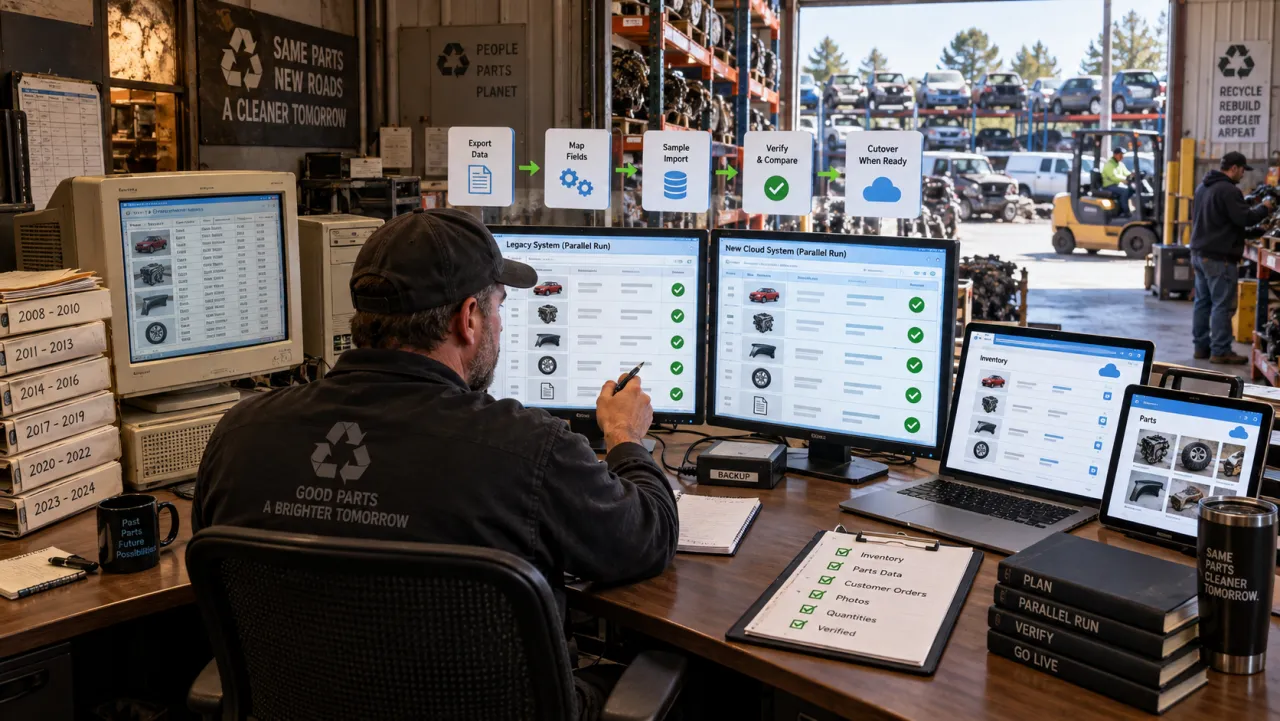
From Excel to a real system: modernizing your yard's inventory
Almost every dismantler starts on paper or in a spreadsheet, and for the first while it works fine. Then the business grows, the spreadsheet stops keeping up, and you cannot quite say when it happened. The move to real software is worth making, but the honest version is more nuanced than “spreadsheet bad, software good.” Here is how to recognize the ceiling, what actually changes when you move, and how to make the switch without the pain. It is one piece of the modern auto recycler software stack.
The signs you have outgrown the spreadsheet
- You cannot answer “do we still have it?” in a few seconds.
- Parts sell on one channel but stay live on another, and you get caught double-selling.
- Fitment lives in your head, so only you can list or quote accurately.
- Photos, prices, and locations are scattered across files, phones, and memory.
- Listing the same part on eBay and Facebook means entering everything twice.
- Aging inventory piles up because nothing flags what is not moving.
There is no magic number of symptoms that means “switch now.” But if parts are selling on one channel while staying live on another, the cost is not hypothetical: it is the refund, the relist, and the buyer you lose. When the spreadsheet is generating that kind of error instead of preventing it, it has stopped saving you time.
The honest version: how far a spreadsheet really goes
It is worth saying plainly, because it builds the case honestly: a spreadsheet goes further than most yards ever use it. Modern Excel has structured Tables, data validation to constrain what goes in a cell, and Power Query to pull and clean data on a repeatable schedule. A disciplined operator can build something genuinely capable, and “just a spreadsheet” undersells it.
The trouble starts the moment more than one person needs it at once. Excel’s shared-workbook mode is mutually exclusive with the very features you would want - you cannot share a workbook that contains a Table, and validation gets fragile once a book is shared or protected. Cloud co-authoring helps, but it does not give you per-cell rules back or a concurrency-safe answer to “is this exact part still available?” And switching to software does not automatically fix your data either - governance comes from a tool that enforces rules, plus the discipline to use it, not from the label “software.”
So the real question is not “spreadsheet versus software.” It is whether your business has hit the three things a flat file genuinely cannot model well for used parts:
- Quantity of one. Every part is a distinct physical unit - this donor’s left mirror, graded, photographed, shelved. A row can hold that, but a spreadsheet has no native concept of “this exact unit is now reserved or sold,” so concurrent edits and channel updates race each other.
- Fitment is many-to-many. One part fits many year, make, model, trim, and engine combinations. Flat cells force you to duplicate or abbreviate that, which is exactly why fitment ends up living in one person’s head instead of in the file. Structured fitment is the thing a spreadsheet models worst - it is a whole discipline of its own, covered in the compatibility software guide.
- Cross-channel availability. A part on eBay, Facebook, and your own site needs one availability record that every channel reads from. A spreadsheet is a passive file; it cannot push a sold flag outward or pull a listing down on its own.
Hit those, and the ceiling is the data model, not your effort.
What a real system actually changes
Moving to purpose-built software is not about features for their own sake. It changes three things that matter:
- One source of truth the tool enforces. Every part - fitment, condition, photos, location, price, and where it is listed - lives in one record, with required fields, roles, and a single availability count. It is a property the tool guarantees, not a byproduct of switching, which is why the enforcement matters more than the feature list.
- List once, sell honestly across channels. Enter a part once and publish it, and when it sells the listing comes down from the other channels near-real-time, with retry and reconciliation. The channels are not symmetric - eBay is automatic through its official API, Facebook Marketplace is assisted because it has no public listing API - and the honest version of “no double sales” is fast, reconciled removal with conflict handling for two buyers hitting the same part at once, not a magic instant lock. The full mechanics are here, and what “real time” should even mean is its own question.
- It scales past you. The business stops depending on one person’s memory, so you can hire, delegate, and grow - and a modern system can propose fitment for a part instead of leaving it trapped with whoever built the sheet, turning “only I can list accurately” into something any staffer can do.
Moving off the spreadsheet without the pain
The two reasons yards stay put are cost and the fear of a painful switch. The switch is smaller than it looks if you stage it instead of flipping everything at once:
- Baseline what you have. List every source - the master sheet, the side sheets, the phones full of photos, the listings live on each channel - and note where each field actually lives.
- Clean the data while it is still in the spreadsheet. Dedupe rows, fix missing part IDs, drop orphan photos and stale listings. Cleaning before you move is the highest-leverage step, because migrating dirty data just relocates the mess.
- Pilot on one category or one location. Just doors, or just one row of the yard - small enough to verify by hand, real enough to prove the workflow.
- Keep the spreadsheet as a read-only snapshot. Freeze it as your fallback during the pilot; do not run both live at once, or you recreate the drift you are trying to escape.
- Reconcile before you trust it. Compare counts, locations, photo attachment, and fitment between the snapshot and the new system, and only advance when the numbers tie out.
- Cut over in waves. Roll the rest in batches, each reconciled, keeping the frozen sheet as rollback until a full clean cycle passes in the new system.
That is the spreadsheet on-ramp. If you are moving off an older software system rather than a spreadsheet, that is a bigger job with its own steps - migrating off legacy recycler software covers it. And this is the tooling decision, not the day-to-day counting itself, which how to inventory a salvage yard walks through.
What it costs, honestly
Cost is real, but weigh the whole picture, not just the sticker. Compare subscription, onboarding, migration, and training against what the spreadsheet is quietly costing you in errors, double-sales, and hours - and ask any vendor the migration questions above before you commit. Modern subscription tools are far more accessible than the legacy systems that used to be the only option, and the point of migration help is that you should not be retyping years of inventory by hand.
How reParta fits
reParta was built for exactly this operator - the yard that has outgrown the spreadsheet but is not looking for the cost or complexity of a legacy management system. It is not inventory bolted onto accounting; it is inventory, fitment, and multichannel selling in one place.
Every part lives in one record: fitment, condition, photos, shelf location, price, and where it is listed. The tool enforces that single source of truth, so you stop reconciling five versions of the same part across tabs and channels. Listing runs where the sales happen - reParta lists to your own eBay account automatically through eBay’s API, and when a part sells it moves to delist near-real-time, with retry and reconcile; Facebook Marketplace is assisted through a browser extension because Facebook offers no public listing API, with the same near-real-time delisting and a manual fallback. Fitment uses reParta’s own built-in OEM cross-reference and part-level fitment, so it comes from real interchange data rather than a guess made under pressure at the listing screen. And each teardown’s real result rolls up into per-donor profit-and-loss, instead of a side spreadsheet for costs. Moving over, reParta offers data migration, so ask us about your file and we will help you get moved. It is all one auto parts inventory management software built for the operator leaving the spreadsheet behind, not adapted to them after the fact.
The spreadsheet was the right tool for the first chapter. The signs above are it asking you to start the next one. Start a free 14-day trial - no card required - or see plans and pricing.
Frequently asked questions
When should a salvage yard move off a spreadsheet?
When the spreadsheet stops answering questions fast and starts causing errors: you cannot say in seconds whether a part is still in stock, parts sell on one channel while staying live on another, fitment lives in one person's head, and listing the same part twice means entering it twice. A disciplined spreadsheet can go further than most yards use it, but a growing used-parts business eventually hits limits a flat file cannot fix - quantity-of-one tracking, many-to-many fitment, and one availability record every channel reads from.
Can't a well-built Excel spreadsheet do the job?
Further than people think - modern Excel has structured Tables, data validation, and Power Query for repeatable imports. The catch is those features fight multi-user reality: you cannot share a workbook that contains a Table, validation is fragile once a book is shared, and there is no audit log or concurrency-safe availability. For a single operator it can work a long time. For a growing team selling one-of-a-kind parts across channels, the data model itself is the limit, not your discipline.
What does a real inventory system change that a spreadsheet cannot?
Three structural things. One source of truth the tool enforces - required fields, roles, and a single availability record - instead of five versions across tabs and phones. List once and sell across channels with near-real-time delisting when a part sells, so you stop double-selling. And it scales past one person's memory, so fitment and pricing knowledge are not trapped with whoever built the sheet.
How do I move off the spreadsheet without a painful switch?
Clean the data while it is still in the spreadsheet (dedupe rows, fix missing IDs, drop orphan photos and stale listings), pilot on one category or one row of the yard, keep the spreadsheet as a read-only snapshot as your fallback, reconcile counts and locations before you trust the new system, then cut over in waves. Switching from an older software system, rather than a spreadsheet, is a bigger job with its own playbook.
Will I have to retype years of inventory to switch?
You should not have to. Good tools offer data migration so your existing records come across rather than being re-keyed by hand. The honest questions to ask any vendor are which fields, photos, and history actually come across, and whether there is a dry run you can check before you commit.