Facebook Marketplace Zelle scam: how it works and how a parts yard stays safe
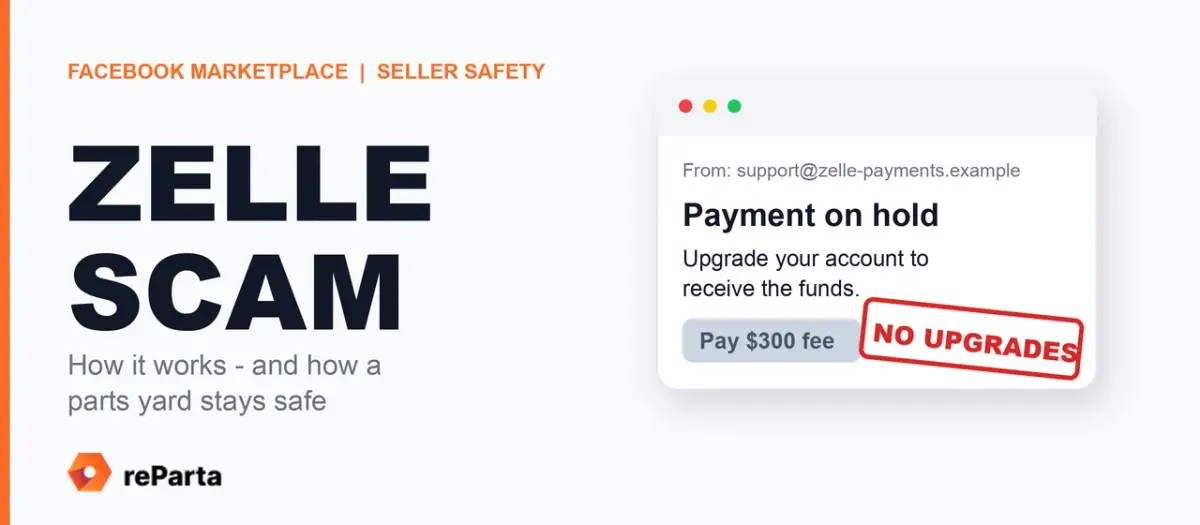
Short answer: the Facebook Marketplace Zelle scam is a fake-payment scam aimed at sellers (also called an overpayment, fake payment notification or “account upgrade” scam). A buyer insists on Zelle, a fake “Zelle” email says the money is on hold until you pay a fee or “upgrade to a business account,” and the buyer offers extra money to cover it. Zelle says there are no upgrades, and the BBB warns that if you repay the “fee” you find the buyer never sent any money. One rule beats every variant: confirm payment yourself, in your own bank account, before the part leaves - never from an email, a text or a screenshot - and do not treat a deposited check or a pending balance as final. Already sent money? Call your bank now, using the number on your card (steps below).
Is this Zelle payment real? Three quick checks.
- Does an email demand a “business upgrade” or a fee to release the money? Zelle says there are no upgrades. Treat it as a scam.
- Is the payment visible only in an email, a text or a screenshot? Then it has not been verified. Look in your own bank or payment app.
- Is the buyer asking you to send back money you cannot confirm receiving? Stop, and contact your bank directly.
Below: how the scam runs, the signs that give it away, what Zelle, the FTC, the BBB and Meta say, and a checklist for sellers with extra steps for yards, where one wrong handover can cost a transmission. If you sell parts only occasionally rather than from a yard, the same steps apply, and selling used auto parts without a yard covers the rest.
How the Facebook Marketplace Zelle scam works
The Better Business Bureau described this scheme against Marketplace sellers in a June 2022 alert. The alert is prose, including one victim’s account, so the steps below are our reconstruction of the scheme, not a quote of the BBB:
- You list something worth several hundred dollars. A buyer messages quickly and wants to pay through a peer-to-peer app: Zelle, with Cash App and Venmo as variants.
- A fake email arrives, styled as Zelle. It says the buyer paid from a “business account” and that you must upgrade your own account before the money can be released.
- The buyer offers to cover the “fee.” In the BBB’s example, about $300 extra “for the upgrade” on a transaction over $600, on the promise that you send it back.
- Fake proof appears. Screenshots show money leaving the buyer’s account, and the pressure to “repay the fees” starts.
- You send your own money. The BBB’s warning: if you refund the scammer, you quickly realize they never sent you any money in the first place.
8 Facebook Marketplace Zelle scam warning signs
| What you see | Why it matters |
|---|---|
| The buyer insists on Zelle, Cash App or Venmo before meeting | The FTC advises: don’t accept a mobile payment from someone you don’t know. Zelle itself calls payments to people you do not know potentially high risk. |
| You are told to “upgrade” your account or pay a fee to receive money | Zelle: there are no upgrades. The BBB: scammers often make up fake policies. |
| The buyer overpays and asks for the difference back | The FTC and Zelle both describe an “overpaying” buyer who asks for a refund as a scam pattern, and Meta lets you report a buyer for offering overpayment. |
| A “Zelle” email that looks official but does not come from @zelle.com or @zellepay.com | Zelle says its emails come only from those domains, and a Zelle logo does not prove an email is real. A matching address alone is not proof: check in your banking app. |
| A screenshot offered as proof of payment | Meta: always check your account to confirm payment, even if they send a screenshot. |
| The chat is pushed off Facebook, or urgency is added | Meta lists moving the conversation off Facebook as a warning sign, and pressure to act fast is a common scam tactic (our note). |
| The buyer wants your address, phone number or a code early | Meta lets you report a buyer for soliciting personal information, and the FTC says never to share a verification code with someone you do not know. |
| You are asked to hold the part while someone else collects (our caution; none of the sources below lists this) | A family member or driver collecting a part is often legitimate. Together with a payment you cannot verify, it is a reason to stop and check. |
One flag is a reason to slow down, not proof. Several together make a deal more suspicious, and a payment you cannot see in your own account is reason enough to stop until you have checked.
An illustrative example of the fake email, not a real message:
From: zelle-support@gmail.com Subject: Payment on hold - upgrade to Business Your buyer’s payment of $650 cannot be released. Upgrade your account to a business account to receive the funds. Your buyer will send an additional $300 to cover the fee; please refund it once received.
Every line is a flag: a free-mail sender, a hold, an “upgrade” that Zelle says does not exist, and extra money you are asked to send back.
The same scam on Venmo and Cash App
The BBB’s alert says the Facebook Marketplace Zelle scam can also work through Cash App and Venmo, and the FTC’s advice is about any payment app: don’t accept a mobile payment from someone you don’t know, and treat a fake payment notification as the scam it is. The details can differ from app to app, but the pattern is similar: a message that looks like it came from the app, a hold or a fee, and money you are asked to send before anything has actually arrived in your own account.
Sources: what Zelle, the FTC, the BBB and Meta say (last verified October 27, 2026)
Everything below comes from the linked pages as we read them on the date above; policies and eligibility rules can change. Dates shown are the publication dates the pages display; the Zelle and Meta pages carry no date.
Zelle (Early Warning Services)
- Its marketplace-scam guidance says a fake email can claim a transaction cannot finish until an account is upgraded, and states that no one can upgrade your account because there are no upgrades. Zelle: How to Avoid an Online Marketplace Scam.
- Its FAQ describes Zelle as a way to send money to friends, family or others you trust, calls payments to people you do not know potentially high risk, and states that Zelle payments cannot be reversed and that Zelle does not offer purchase protection, while adding that qualifying imposter scams may be eligible for reimbursement. Zelle FAQ.
- You send money by adding the recipient’s email address or U.S. mobile number. Zelle: How can I use Zelle?
- For business use, your bank or credit union must offer Zelle for your business account type, and fees depend on the bank. Zelle small business FAQ.
Federal Trade Commission (FTC)
- A scammer posing as a buyer may insist on a payment app and send a fake payment notification, or claim they accidentally paid twice and ask you to refund one payment. FTC, July 27, 2022.
- Never deposit a check for more than the selling price, and do not accept a mobile payment from someone you do not know (same alert).
- A deposited fake check usually shows as available within two days (same alert), yet it can take weeks for the bank to find out it is fake, and the bank then takes the money back. FTC, fake check scams (June 2025).
- Do not share a verification code with someone you do not know (July 2022 alert). Report scams at ReportFraud.ftc.gov.
Better Business Bureau (BBB)
- The Facebook Marketplace upgrade scam with its red flags. BBB scam alert, June 24, 2022. The BBB also asks sellers to report suspicious buyers to BBB Scam Tracker, even if they did not fall for it.
Meta
- Always check your account to confirm payment, even if a buyer sends a screenshot, and report buyers who offer overpayment or ask for personal information. Meta: Trust and Safety on Marketplace.
- Meta does not offer refunds for any person-to-person or offsite transactions, and it treats moving a conversation off Facebook as a warning sign. Meta Help: Avoiding scams on Facebook.
- Purchase Protection covers eligible orders placed with shipping or checkout; local pickups and Messenger transactions do not qualify. Meta Help: Purchase Protection.
The same scam in other costumes
The Zelle script has relatives. The FTC describes them, and most share one move: they get you to send real money, or to hand something over, before the “payment” is proven.
- Fake check overpayment. A check for more than the price, then a request to send back the difference. The check looks real and may even show in your account, then bounces weeks later.
- “Accidental” double payment. The buyer claims they paid twice and asks you to refund one payment before any money has arrived.
- Verification-code request. A buyer asks you to share a verification code sent to your phone. The FTC says not to share any verification code with someone you do not know: with it, a scammer can set up a Google Voice number tied to your phone number and use it to hide their identity while scamming others.
- Out-of-town buyer with an overpayment check. The FTC’s February 2025 alert on online car sellers describes a deposit check for more than the agreed price from a buyer who says they cannot inspect the car, and advises considering an escrow or online payment service when you sell a car online.
Why high-value parts attract the Facebook Marketplace Zelle scam
The BBB says the Facebook Marketplace Zelle scam goes after big-ticket listings worth several hundred dollars or more, and a used engine, transmission or control module easily clears that bar. Our read: a used part is one of one, and buyers for a rare module are few, so a yard is more tempted to be flexible about waiting, holding or letting someone else collect. The scam leans on that pressure: speed, a plausible story and a payment that only looks done.
Honest buyers do send a driver or a family member to collect a heavy part, so someone else collecting is not proof of a scam. The risk is a payment you cannot verify combined with someone else walking out with the part. Design your process around that, and keep selling to honest buyers.
How to avoid the Facebook Marketplace Zelle scam as a seller (with extra steps for a parts yard)
This protection checklist against the Facebook Marketplace Zelle scam is our recommended practice, built on the sources above. It is not a Meta, Zelle or FTC rule, and where an item rests on a source we name it. The wider local-selling workflow is in the dismantler’s playbook for Facebook Marketplace.
The 30-second release check at the counter:
- Right part, right buyer, right price.
- Cash, or a payment you checked yourself in your own account. Never a screenshot, an email or an unfamiliar check.
- Know who is collecting the part.
- Mark the sale in your record, then hand over.
The full checklist behind those four steps:
- Write your payment terms before anyone asks. First line of the listing and in your first reply. A block you can copy: “Payment: cash at pickup, or payment confirmed in my own account before the part leaves. No deposits or prepayments through payment apps, and I never send money to release a payment. Pickup by the buyer or a person they name in the chat.”
- Keep the conversation in Messenger. Meta treats a request to move off Facebook as a warning sign, and a message record helps you document what was agreed.
- Check the money yourself. Open your own banking app or payment app, never a link in an email. A screenshot, a text and an email are not payment (Meta), and the FTC warns that a deposited check can look fine before it is found to be fake. For a high-value part, ask your bank what the status you see means and what risks remain before you release it.
- Never send a refund at a buyer’s direction. Not for a check, not for a payment app. If a buyer says they overpaid, tell them to sort it out with their own bank or payment provider. The FTC and Zelle both describe the overpaying buyer who asks for a refund as a scam pattern.
- Do not rely on a check from a stranger. The FTC says never to deposit a check for more than the selling price, and that a fake check can look fine in your account for weeks. Ask for cash at pickup instead.
- Yard add-on: name the pickup person. If someone else collects, ask the buyer to name that person in the chat before pickup, and write the name in your sale record. Do not keep copies of anyone’s ID. A polite request for a name is normal; if a buyer will not give one on a high-value part, pause the sale.
- Yard add-on: release the part last. Payment you have checked yourself first, handover second, every time, whatever the story about being late or out of town.
- Never share a verification code, even with a buyer who says it is for “proof” or to “confirm” the payment (FTC).
- Report it. Report the buyer on Facebook, report the scam at ReportFraud.ftc.gov, and add it to BBB Scam Tracker even if you did not lose money. It helps the next seller.
What to do after a Facebook Marketplace Zelle scam
- Call your bank now, using the number on the back of your card or inside your banking app, and tell them exactly what happened. Zelle’s own guidance points you to your financial institution if a payment has already been made.
- Ask what options it has. Zelle states that its payments cannot be reversed and carry no purchase protection, but also that qualifying imposter scams may be eligible for reimbursement, so tell your bank exactly what happened. Recovery is not guaranteed.
- Report it to the FTC at ReportFraud.ftc.gov, to Facebook through the Marketplace report tool, and to BBB Scam Tracker.
- Keep the evidence, then block the buyer. Save the messages, emails and screenshots first, in case your bank or the FTC asks for them.
Where reParta fits (and where it does not)
The Facebook Marketplace Zelle scam is a banking and verification problem. A double sale is an inventory problem. They can happen in the same transaction but need different controls. reParta does not process payments and cannot verify that money arrived: your bank does that. What it does is keep your records consistent while you confirm payment:
- One inventory record. Each part is available, paused or sold in one place, with its photos, part number and fitment attached, so your record of what left the yard is the same on every channel.
- Take a Facebook listing down while a payment is confirmed. From the part card, “Take down” asks the extension to hide the listing temporarily (buyers see it as Pending on Facebook) and “Make available” brings it back if the buyer never pays. On Facebook, that keeps a listing from advertising a part you have already promised to someone. It does not touch listings on other channels, and because Facebook is an assisted workflow, check the listing’s status on Facebook when you need certainty.
- Mark it sold once, take it down on your other channels. When a part sells, reParta coordinates its removal from your connected eBay and Facebook listings: on eBay through the native integration, on Facebook through the reParta browser extension, which works inside your own logged-in Facebook session. Facebook has no public listing API for this, so the Facebook step is assisted: Chrome has to be open with the extension connected.
reParta does not touch payments, but if you sell the same parts on eBay and Facebook, multi-channel sync shows how one record keeps both in step, and how auto-delisting works and what a double sale really costs cover the rest of the double-sell problem.
Selling the same parts on Facebook and eBay? Try reParta free for 14 days - no card required. It keeps inventory in one place and helps coordinate your connected listings. It does not handle or verify payments.
Related reading
- Selling used car parts on Facebook Marketplace: a dismantler’s playbook - the full local-selling workflow, including meeting buyers safely.
- The best marketplaces to sell used auto parts - how each channel compares.
- Never double-sell again: how auto-delisting across eBay and Facebook works - why a sold part must come off every channel you sell on.
- Car-Part vs eBay vs Facebook: where to list used parts - which part belongs on which channel.
- The real cost of double sales - what happens when two buyers pay for one part.
Takeaways
- The scam is a fake payment: the buyer insists on Zelle, a fake “Zelle” email demands a fee or an “upgrade,” and, as the BBB warns, if you repay it you find no money was ever sent.
- Zelle says there are no upgrades, that its payments cannot be reversed and carry no purchase protection, and that qualifying imposter scams may be eligible for reimbursement.
- Never send a refund at a buyer’s direction, never share a verification code, never accept a mobile payment from a stranger, per the FTC.
- Confirm payment in your own account before the part leaves, as Meta advises, even when you are shown a screenshot, and do not treat a deposited check or a pending balance as final.
- For a yard: write your payment terms first, keep the chat on Messenger, name the pickup person, and release the part last.
- reParta does not handle payments, but it keeps one inventory record, can ask its extension to hide a Facebook listing temporarily while a payment is confirmed, and coordinates taking a sold part down from your connected eBay and Facebook listings.
Last verified: October 27, 2026. Zelle is a trademark of Early Warning Services, LLC. reParta is not affiliated with Zelle, Meta, the FTC or the BBB.
Frequently asked questions
What is the Zelle scam on Facebook Marketplace?
It is a fake-payment scam aimed at sellers, also described as an overpayment, fake payment notification or account-upgrade scam. A buyer insists on paying by Zelle, then a fake email that looks like it came from Zelle says the money is on hold until you pay for a 'business account upgrade', often with a promise that the buyer will send extra to cover the fee. The Better Business Bureau warned in 2022 that if you refund the scammer you find they never sent you any money, and Zelle's own guidance says there are no upgrades.
Is there a Zelle business account upgrade fee?
Zelle's marketplace-scam guidance states that no one can upgrade your account because there are no upgrades. Its small-business page says only that business use depends on your bank or credit union and that you should check with your financial institution about fees. A buyer or an email demanding that you pay to receive money is therefore a scam signal.
I sent money to a Zelle scammer - can I get it back?
Possibly, but recovery is not guaranteed. Zelle's own FAQ says Zelle payments cannot be reversed and that Zelle does not offer purchase protection, but it also says qualifying imposter scams may be eligible for reimbursement. Contact your bank or credit union right away using the number on your card or in your banking app, tell them exactly what happened and ask them to investigate your options, and report the scam to the FTC at ReportFraud.ftc.gov.
Will Facebook reimburse me if a Marketplace buyer tricks me into paying through Zelle?
Do not count on it. Meta's help pages say Meta does not offer refunds for any person-to-person or offsite transaction, and Purchase Protection covers orders placed with shipping or checkout, not local pickups or Messenger transactions. Meta's Marketplace safety page lets you report a buyer for behaviours such as offering overpayment. Whether you can recover money is a separate question, for your bank.
How do I confirm a buyer really paid me?
Check your own bank account or payment app yourself, never an email, text or screenshot. Meta's Marketplace safety page says to always check your account to confirm payment, even if the buyer sends a screenshot of the transaction. Zelle says its emails come only from @zelle.com or @zellepay.com and that a Zelle logo does not make an email legitimate. A matching sender address alone is not proof, so confirm in your own banking app.
Is it safe to accept Zelle on Facebook Marketplace?
Zelle describes itself as a way to send money to friends, family or others you trust, and calls transactions with people you do not know potentially high risk. The FTC advises against accepting a mobile payment from someone you do not know. For a parts yard, the safer default is cash, or a payment you have checked yourself in your own account before the part leaves.
Why does the buyer ask for my email or phone number?
Zelle sends money to a recipient's email address or U.S. mobile number, so being asked for one of them is not a scam sign by itself. The warning signs come next: a fake 'Zelle' email from a domain other than @zelle.com or @zellepay.com, a 'hold' or 'upgrade' fee, or a request for extra money to be sent back.
What if the money shows in my account?
For a check, showing is not proof: the FTC says a deposited check usually shows as available within two days and can still take weeks to be found fake, after which the bank takes the money back. For a payment app, look at your own bank or payment app, not an email or screenshot. A pending balance is not final either. For a high-value part, ask your bank what the status you see means and what risks remain before you release it - that last step is our recommended practice, not a Zelle or FTC rule.
Should I give a buyer my address or phone number?
Keep the conversation in Messenger first. Meta treats a request to move off Facebook as a warning sign and lets you report buyers who solicit personal information. Share an address only once a pickup is agreed, which is our recommended practice, and never share a verification code with someone you do not know (FTC).
Can software stop the Zelle scam?
No. reParta does not process or verify payments, and nothing in an inventory system can tell you whether money reached your bank. What it can do is keep your records consistent while you confirm payment: its browser extension can hide a Facebook listing temporarily so buyers see it as Pending, restore it if the buyer never pays, and help take a sold part off your other connected channels. Facebook is an assisted workflow, so check the listing on Facebook when you need certainty.